
Webhook 用法 (Webhook usage)
配置 (Configuration)
通过在配置文件中添加 webhook 部分并将 webhook.enabled 设置为 true 来启用 webhook。
示例配置(已使用 IFTTT 测试):
json
  "webhook": {
        "enabled": true,
        "url": "https://maker.ifttt.com/trigger/<YOUREVENT>/with/key/<YOURKEY>/",
        "entry": {
            "value1": "正在买入 {pair}",
            "value2": "限制价格 {limit:8f}",
            "value3": "{stake_amount:8f} {stake_currency}"
        },
        "entry_cancel": {
            "value1": "正在取消 {pair} 的买入挂单",
            "value2": "限制价格 {limit:8f}",
            "value3": "{stake_amount:8f} {stake_currency}"
        },
         "entry_fill": {
            "value1": "{pair} 的买入成交",
            "value2": "价格:{open_rate:8f}",
            "value3": ""
        },
        "exit": {
            "value1": "正在退出 {pair}",
            "value2": "限制价格 {limit:8f}",
            "value3": "利润:{profit_amount:8f} {stake_currency} ({profit_ratio})"
        },
        "exit_cancel": {
            "value1": "正在取消 {pair} 的离场挂单",
            "value2": "限制价格 {limit:8f}",
            "value3": "利润:{profit_amount:8f} {stake_currency} ({profit_ratio})"
        },
        "exit_fill": {
            "value1": "{pair} 的离场成交",
            "value2": "价格:{close_rate:8f}.",
            "value3": ""
        },
        "status": {
            "value1": "状态:{status}",
            "value2": "",
            "value3": ""
        }
    },
webhook.url 应指向您的 webhook 接收地址。如果您使用的是 IFTTT(如上例所示),请在 URL 中填入您的事件名称 (event) 和密钥 (key)。
您可以将 POST 体格式设置为 Form-Encoded (默认)、JSON-Encoded 或 Raw Data。分别使用 "format": "form", "format": "json" 或 "format": "raw"。
嵌套 Webhook 配置 (Nested Webhook Configuration)
某些 Webhook 目标需要嵌套结构。这可以通过将内容设置为字典或列表(而不是直接设置为文本)来实现。仅支持 JSON 格式。
json
"webhook": {
    "enabled": true,
    "url": "https://<yourhookurl>",
    "format": "json",
    "status": {
        "msgtype": "text",
        "text": {
            "content": "状态更新:{status}"
        }
    }
}
其他配置 (Additional configurations)
webhook.retries: 请求失败时的最大重试次数(默认 0,禁用)。webhook.retry_delay: 重试之间的等待时间(默认 0.1 秒)。webhook.timeout: 等待响应的超时时间(默认 10 秒)。allow_custom_messages: 设置为true以允许从策略内部通过self.dp.send_msg()发送自定义消息。
Webhook 消息类型 (Webhook Message types)
进场 / 进场成交 (Entry / Entry fill)
当机器人下达或成交买入/增加仓位订单时触发。可用参数包括:trade_id, pair, direction, open_rate, amount, stake_amount, enter_tag 等。
进场取消 (Entry cancel)
当机器人取消买入订单时触发。
离场 / 离场成交 (Exit / Exit fill)
当机器人下达或成交卖出/退出仓位订单时触发。可用参数包括:profit_amount, profit_ratio, exit_reason, close_rate 等。
离场取消 (Exit cancel)
当机器人取消离场订单时触发。
状态 (Status)
用于定期状态消息(已启动/已停止等)。仅支持 {status}。
Discord
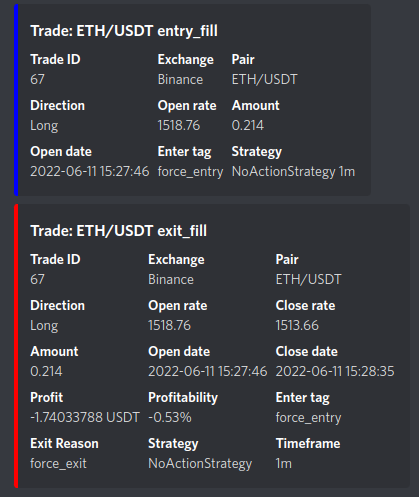
Discord 提供了专门的 Webhook 形式。您可以如下配置:
json
"discord": {
    "enabled": true,
    "webhook_url": "https://discord.com/api/webhooks/<您的 webhook URL ...>",
    "exit_fill": [
        {"交易 ID": "{trade_id}"},
        {"交易所": "{exchange}"},
        {"交易对": "{pair}"},
        {"方向": "{direction}"},
        {"利润": "{profit_amount} {stake_currency}"},
        {"盈利率": "{profit_ratio:.2%}"},
        {"离场原因": "{exit_reason}"}
    ],
    "entry_fill": [
        {"交易 ID": "{trade_id}"},
        {"交易所": "{exchange}"},
        {"交易对": "{pair}"},
        {"开仓价格": "{open_rate}"},
        {"入场标签": "{enter_tag}"}
    ]
}
通知在 Discord 中的默认外观如下:
同样,通过设置 allow_custom_messages: true,可以从策略中向 Discord 发送自定义消息。